Tradovate + NinjaTrader • prop-ready execution layer View pricing →

Execute the idea you intended not the click you end up regretting.

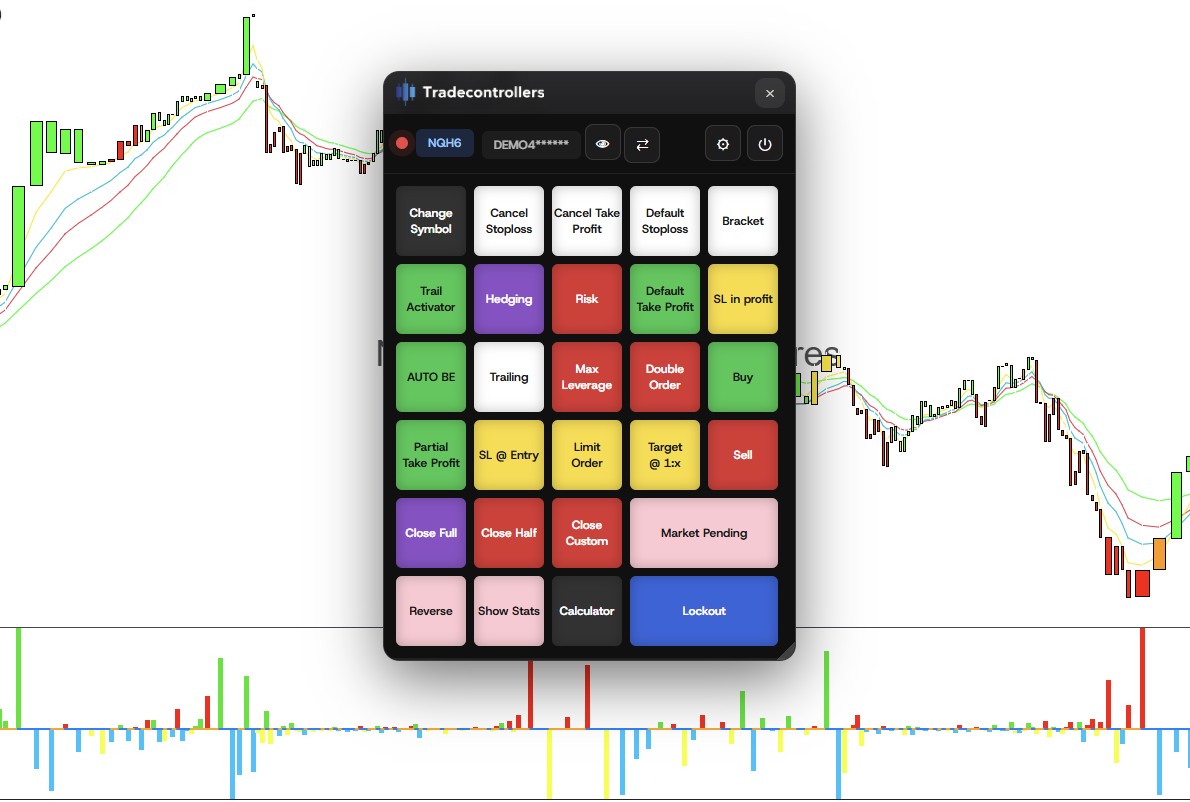
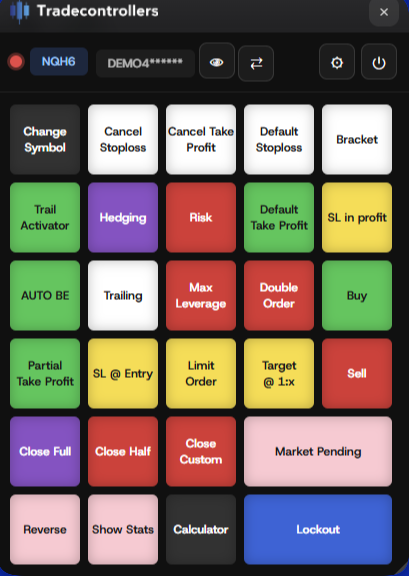
Tradecontrollers is a digital risk keypad that makes high-stress actions consistent: presets, bracket controls, one-tap management, and lockout protection to prevent overtrading.

Ticker
Tradovate connected
TradeControllers controller preview
Compatible with common prop workflows
Works where prop traders execute: Tradovate and NinjaTrader environments.
APEX Trader Funding Blusky Purdia Tradeify and more
Product

Built for execution. Not aesthetics.

Tradecontrollers puts your highest risk actions behind deliberate, consistent buttons: defaults, cancels, brackets, partials, and lockout, this way you may perform more consistently in challenges and potentially take payouts!

Intent first workflow

Reduce accidental clicks by moving critical actions into a repeatable keypad layout.

Risk guardrails

Defaults for SL/TP, bracket controls, and “safe” actions that keep you inside your plan.

Overtrading lockout

Trigger a lockout after defined events (loss streaks, max daily risk, time windows, profit goal) to stop revenge trading and protect payouts.

Demo

See the full workflow.

A quick look at keypad execution, risk presets, bracket management, and lockout behavior.

Preset → Execute
Default protection applied immediately.
Manage brackets
Cancel TP/SL, partials, BE and trailing actions.
Lockout protection
Stop trading when your rules say stop.
Risk Functions

Every button is a risk decision.

Focused on the actions traders repeatedly need under pressure so execution stays controlled.

TradeControllers controller
Execution
Fast, consistent order entry under stress.
  • Buy / Sell
  • Limit order / Market pending
  • Double order
  • Reverse / Hedge toggles
Risk & Brackets
Default protection + one-tap bracket management.
  • Default stoploss / take profit
  • Cancel stoploss / cancel take profit
  • SL @ entry / SL in profit
  • Partial take profit / target presets
Discipline
Rules that prevent overtrading spirals.
  • Lockout (manual + rule-based)
  • Max leverage / risk caps
  • Auto BE / trailing activator
  • Close full / half / custom
Utility
Fast context so you don’t break your plan.
  • Show stats (session feedback)
  • Calculator (position sizing)
  • Change symbol / accounts
Outcome

When execution is standardized, your edge is evaluated on the trade idea — not avoidable operator error.

Compatibility

Built for Tradovate & NinjaTrader workflows.

Connect → set parameters → execute with guardrails.

Broker
NinjaTrader & Tradovate
Keypad actions mapped to consistent order controls.
Accounts
Prop + Personal
Same layout across evaluation, funded, and personal live.
Install
Chrome extension
Works on desktop browsers supporting extensions.
Tradecontrollers is an independent product and is not affiliated with or endorsed by Tradovate, NinjaTrader, or any prop firms.
Pricing

One plan. No tiers.

One-time access. No feature gating.

Early Access
Everything included, forever.
For prop traders who want guardrails and consistent execution.
$39.99
one time
Get Access
Secure checkout via Whop
Included
  • • All current + future features
  • • Lockout
  • • Advanced bracket controls
  • • Stats + calculator
Designed for
  • • Tradovate / NinjaTrader
  • • Prop evaluation + funded accounts
  • • One-tap risk actions
  • • Consistent execution under stress
Tradecontrollers is an execution tool and does not provide trading advice, signals, or automated trading.
FAQ

Common questions

Is this an auto-trader?

No. Tradecontrollers is an execution control layer (a keypad) that helps you place and manage orders deliberately.

Will I become profitable?

No. Tradecontrollers may improve execution discipline, but trading is risky. Use risk capital only. Losses may exceed the initial investment. Past results do not predict future outcomes.

What problem does it solve?

Accidental clicks, inconsistent bracket placement, rushed risk changes, and overtrading spirals.

Will it work with my prop firm?

If your prop firm supports Tradovate or NinjaTrader, Tradecontrollers is designed to fit that environment.

How do I install?

Tradecontrollers works on any laptop or desktop that supports Chrome extensions. After purchase, you’ll receive setup steps and an access key by email.

It’s not opening the extension.

Ensure a supported trading environment is open (TradingView in-browser, or NinjaTrader/Tradovate web). If the popup is blocked, allow popups for the site and try again.

It’s asking me for an access key.

This is expected. Check your email after purchase for the access key. If you need help, open a ticket in Discord.

Is it affiliated with NinjaTrader or Tradovate?

No. Tradecontrollers is independent and is not endorsed by NinjaTrader, Tradovate, or any prop firms.

Get access
Standardize execution. Protect payouts.
One-time purchase. Keep every update.